
Y222 Game APK Download 2026 – Complete Android Guide, App Details and Registration
5 MB
1.0
Android 9+
999
Description

Y222 Game: Everything Android Users Should Know
When searching for a new gaming application, most users want straightforward answers. Is there an Android version? Where can the application be accessed? How does registration work? And what should someone check before using the platform?
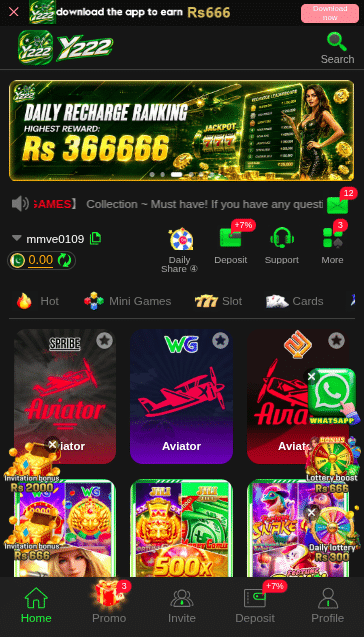
These are the questions behind searches for Y222 Game.
Y222 is associated with an online gaming platform that has attracted searches for its APK, mobile access and account features. For someone discovering the name for the first time, it can be difficult to separate useful information from repeated promotional descriptions.
This article takes a more practical approach. It explains what to look for when accessing Y222, how Android APK installation works, what to expect from account management and how to avoid common mistakes.
Understanding the Y222 Gaming Platform
Y222 is a name used in connection with online gaming services and mobile access. Its appearance in APK-related searches suggests that Android users are particularly interested in finding an application or a convenient mobile way to access the platform.

The important thing to understand is that a platform name does not automatically identify a particular application file. Multiple websites can publish pages using the same name, and their descriptions may not always match.
That is why checking the actual destination and application information matters.
Rather than relying on a download button alone, users should establish whether the page belongs to the intended platform and whether its available information is consistent.
For anyone researching Y222, this is the first step before considering installation or account creation.
Why Are People Searching for Y222 APK?
The APK search usually comes from a practical requirement: Android users want an application that can be opened directly from their phones.
A dedicated application can provide a familiar mobile entry point, depending on how the service is designed. It may also make returning to an account more convenient than repeatedly locating a website through a browser.
However, an APK is simply an Android installation file. Its presence does not prove that it is the official application.
When researching Y222 APK, pay attention to the following details:
- Application name and developer information.
- Version number and release information.
- File size and package identity, where available.
- Minimum Android requirements.
- Requested application permissions.
- Whether the platform’s own website identifies the download as its application.
If these details are missing, contradictory or difficult to verify, there is no reason to rush into installing the file.
Y222 Game Android Installation: A Practical Walkthrough
Android devices allow applications to be installed from outside Google Play, but users should understand the process before proceeding.
1. Find the Correct Application Source
Start by identifying the platform you actually intend to access. Do not assume that every page containing the words Y222 Game offers the same application.
Look for consistent application details and a clear download destination.
2. Download the Installation Package
If a verified Android package is provided, download it using your mobile browser.
Wait for the download to finish completely. An interrupted download can leave an incomplete file that Android cannot install.
3. Open Your File Manager
Navigate to the Downloads folder and locate the APK.
Check the filename and file information. If the downloaded package has an unexpected name or comes from an unknown source, stop and investigate before opening it.
4. Allow Installation When Appropriate
Android may display a security message because the application was obtained outside Google Play.
Only allow the relevant installation permission if you have independently checked the source and have decided to proceed.
There is no need to disable other Android security protections.
5. Complete Installation
Tap the installation package and follow the instructions shown on your screen.
If Android displays an unusual warning, do not ignore it simply to complete the installation.
6. Open and Inspect the Application
Once installed, launch Y222 and inspect its interface.
Check the available navigation, account controls, support information and terms before entering sensitive details.
Exploring the Y222 Interface
A useful gaming application should make its important sections understandable without requiring users to guess what individual buttons do.
When exploring Y222, pay attention to these areas.
Home section: This is generally the main entry point where users can inspect the available platform sections.
Game selection: Check which gaming activities are actually accessible in your version. Do not assume that every title mentioned on another website is included.
Personal account: This area should provide access to profile-related information and account settings.
Transaction information: If financial services are offered, users should be able to review the relevant transaction conditions and account records.
Help and support: Check whether the platform provides a recognizable support channel and clear instructions for account-related issues.
The interface and available features can change. A description written for an older version should not be treated as a permanent feature list.
Creating a Y222 Game Account
Registration is an important stage because it connects your personal account information with the platform.
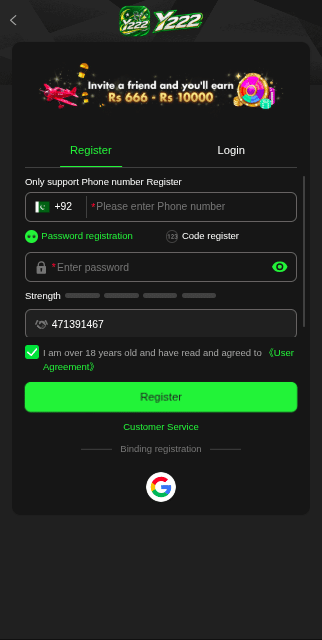
If Y222 provides a registration option, follow the instructions displayed by the verified service.
The general process may include:
- Visit the intended Y222 application or website.
- Locate the account registration section.
- Enter the required registration information.
- Set a strong and unique password.
- Complete any requested verification.
- Read the relevant account terms.
- Submit your information.
Some services may use mobile-number verification. If a code is sent to your device, enter it only in the legitimate registration interface.
Never forward an OTP to someone who contacts you through WhatsApp or another messaging service.
Also, avoid registering multiple accounts simply because the first attempt does not immediately work. Check for an error message and follow the appropriate recovery instructions.
Accessing Your Existing Y222 Account
For returning users, the login process should be simpler than registration.
Open the same verified service where the account was created and locate its login option.
Enter the requested account credentials and complete any security checks.
If you are using a shared phone, avoid saving your password in a browser or application that other people can access.
A few common login problems deserve attention:
- Incorrect password: Check the spelling and keyboard settings.
- Verification problem: Make sure the registered contact method is accessible.
- Temporary loading issue: Test your connection and reopen the application.
- Account access restriction: Check the platform’s instructions or contact its identified support service.
- Forgotten credentials: Use the legitimate account recovery option, if available.
Repeatedly entering incorrect passwords may create additional account restrictions, so it is better to identify the problem first.
Y222 Game and Mobile Performance
Application performance depends on several factors, including the phone’s hardware, Android version, available storage and network connection.
If Y222 is slow to open, there are some basic checks worth performing.
First, make sure your phone has enough free storage. Applications may need additional space for temporary files and updates.
Second, check whether your internet connection is stable. A weak connection can affect applications that rely on online services.
Third, close unnecessary background applications if your device has limited memory.
Finally, check for an application update through a source you trust. Do not install an unfamiliar APK simply because another website labels it as the newest version.
If you are researching other mobile gaming platforms, take a look at X666 Game download for more information about its Android application.
Y222 Game in Pakistan: Payment and Account Considerations
Pakistani users researching Y222 may also want information about local payment options.
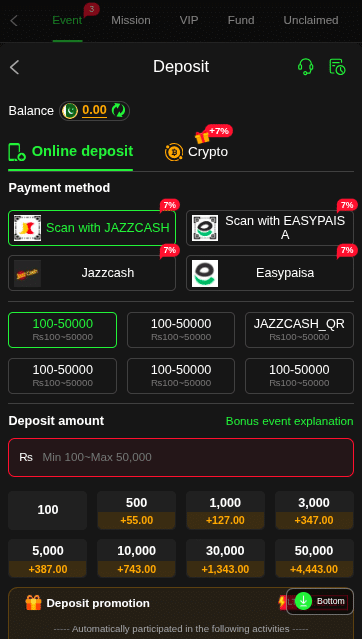
Services such as JazzCash and Easypaisa are commonly searched alongside gaming applications in Pakistan. However, this does not establish that either payment service is currently supported by Y222.
Check the actual payment section and applicable platform terms before relying on any advertised method.
If deposits or withdrawals are available, understand the following before proceeding:
- Minimum and maximum transaction limits.
- Any applicable processing fees.
- Account verification requirements.
- Withdrawal eligibility conditions.
- Processing times and possible restrictions.
- The procedure for reporting a disputed transaction.
Never deposit money based on a screenshot, an agent’s personal promise or a promotional message alone.
Online gaming involving wagers can result in financial losses. It should never be approached as a reliable method of earning money.
Protecting Your Device While Using Y222
Security deserves attention whenever an application is installed manually.
A file carrying the correct application name can still be an unrelated or modified package. The safest approach is to verify the source rather than trusting its filename.
Here are some sensible precautions:
Keep Play Protect enabled: Android’s built-in security feature can help identify potentially harmful applications.
Review permissions: An application should not receive unnecessary access to sensitive information.
Protect your credentials: Avoid reusing passwords from email, banking or social accounts.
Use secure connections: Avoid entering account information through suspicious pages or unknown links.
Check platform policies: Understand how personal information is collected and used.
Be careful with financial claims: Bonuses and promotional balances can have conditions, and advertised earnings are not guaranteed.
These precautions are useful not just for Y222 but for any Android application obtained outside the usual app marketplace.
Frequently Asked Questions
1. What is the Y222 Game APK?
Y222 Game APK refers to an Android installation package associated with the Y222 gaming platform. Users should verify the source and application identity before installing it.
2. Does Y222 work on all Android phones?
Not necessarily. Compatibility depends on the Android version, application requirements, device architecture and available storage.
3. Can I use Y222 without installing an APK?
That depends on whether the platform currently provides a browser-based version. Check its verified website for available access methods.
4. How do I update Y222 Game?
Check for an update through the platform’s identified download source. Compare the available version information before installing a replacement package.
5. Why does the Y222 application show an error?
Possible reasons include connection problems, incompatible application files, insufficient storage or temporary service issues. The exact error message can help identify the cause.
6. Is Y222 suitable for beginners?
New users should first understand the interface, registration requirements, available services and platform conditions. Anyone considering financial participation should understand the associated risks.
7. Does Y222 guarantee earnings?
No. Online gaming results are not guaranteed, and users should never assume that deposits will produce a profit.
Final Thoughts on Y222 Game
Y222 Game is worth researching carefully if you have come across its name while looking for Android gaming applications in Pakistan.
The most important part of getting started is not simply finding an APK download button. It is making sure that the application belongs to the intended service, understanding how its account system works and checking the conditions attached to any available features.
Android installation is relatively straightforward, but manually installing applications requires more care than downloading directly from an established app marketplace.
Take time to review the application source, protect your account information and understand the platform’s terms. A little verification before installation can help you avoid unnecessary problems later.
For more Android gaming information, APK guides and updates, visit Markhore.com.pk and explore its latest gaming articles.
Download links
How to install Y222 Game APK Download 2026 – Complete Android Guide, App Details and Registration APK?
1. Tap the downloaded Y222 Game APK Download 2026 – Complete Android Guide, App Details and Registration APK file.
2. Touch install.
3. Follow the steps on the screen.